.png?width=250&height=34&name=BS-logo-pb%20(1).png)
There are 2 ways of updating the status of a Product, the first option is via the DLS - learn more HERE.
The second option is through the Brandscope Interface following the steps below:
- Select SETUP > PRODUCTS.
- Use the search box at the top of the column to find the product.
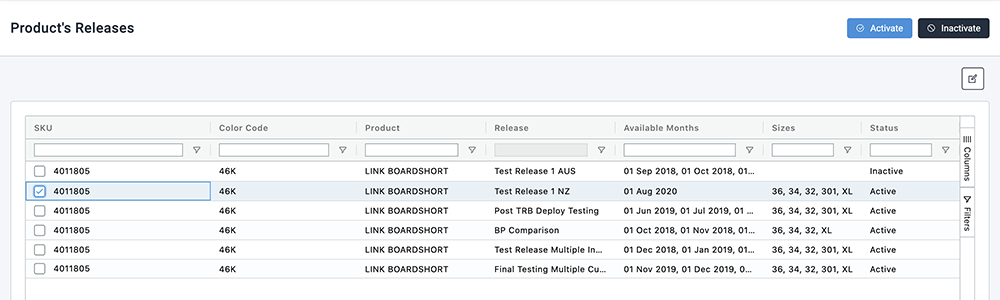
- Select the Product and then select the More icon.
- From the dropdown select Product Releases.
- Select the Product and then click either Activate/Inactivate for each release.
🗒️ Note: This will inactivate/activate the whole product and all sizes attached to it.
Updating Product Status by SIZE in Brandscope
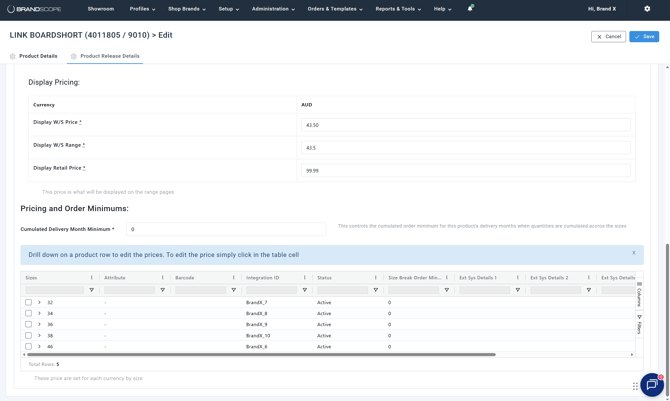
- To Inactivate a size, repeat steps 1-7 above, select the Product and then the Edit icon. This will take you to the PRODUCT RELEASE EDIT page.
- Select the PRODUCT RELEASE DETAILS tab.
- Select the sizes you wish to edit and click the checkbox in the Actions column.
- Underneath the size breaks, click either Activate/Inactivate.