.png?width=250&height=34&name=BS-logo-pb%20(1).png)
Why this matters
- Quickly assign or update segments across multiple products
- Reduce manual product-by-product updates
- Control retailer visibility to segmented products within a release
Before you start
❗Warning: Please ensure:
- Segments are enabled for the Brand
- Segments are enabled at Release level
👉 Contact your Brandscope Account Manager if you require assistance enabling this feature.
Required Columns
The file should contain the following columns:
- SKU
- Product Colour Code
- Brand Name
- Segment Names
Important
- Additional columns in the file will be ignored during import
- Do not remove the required columns
- Segment names must already exist on the Brand
Steps
- Go to Setup → Brands
- Select your Brand
- Click the Export icon
- Select: Export Brand Products with Segments
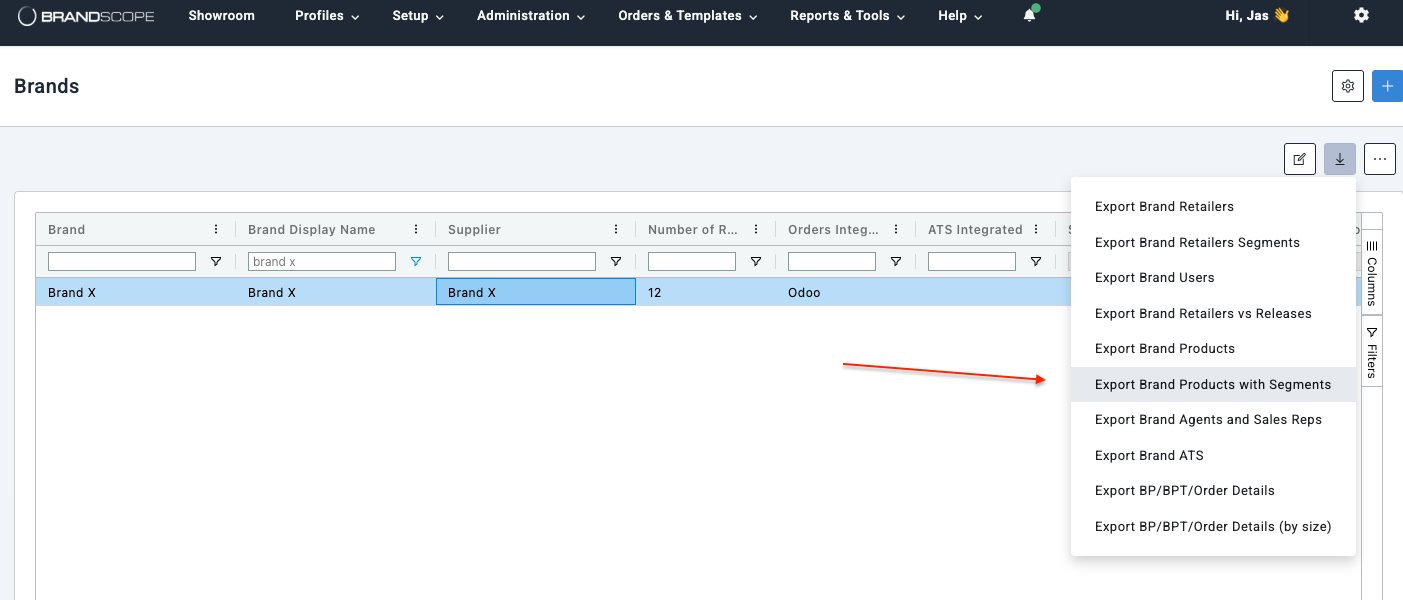
- Download file and Update the Segment Names column as required
- Save file as CSV
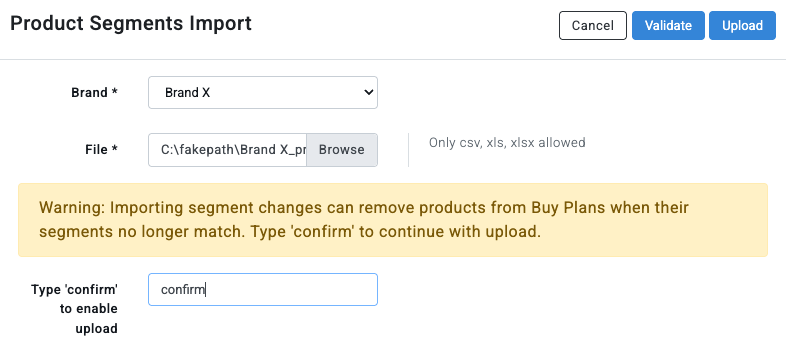
- Go to Administration → Product Imports
- Select the Product Segments Import tab
- Click the + Add icon
- Click Upload
Multiple Segments
If assigning multiple segments to a product:
- Separate segment names with commas
Example: VIP, Clearance, International